
Document workflow automation
Documents are where operations slow down: prepared in one tool, emailed for review, signed in another, filed nowhere. We build document workflows as systems — preparation, preview, e-signing, stamping, storage, and state tracking in one place — and, where the volume justifies it, apply OCR and extraction so documents become structured data instead of attachments.
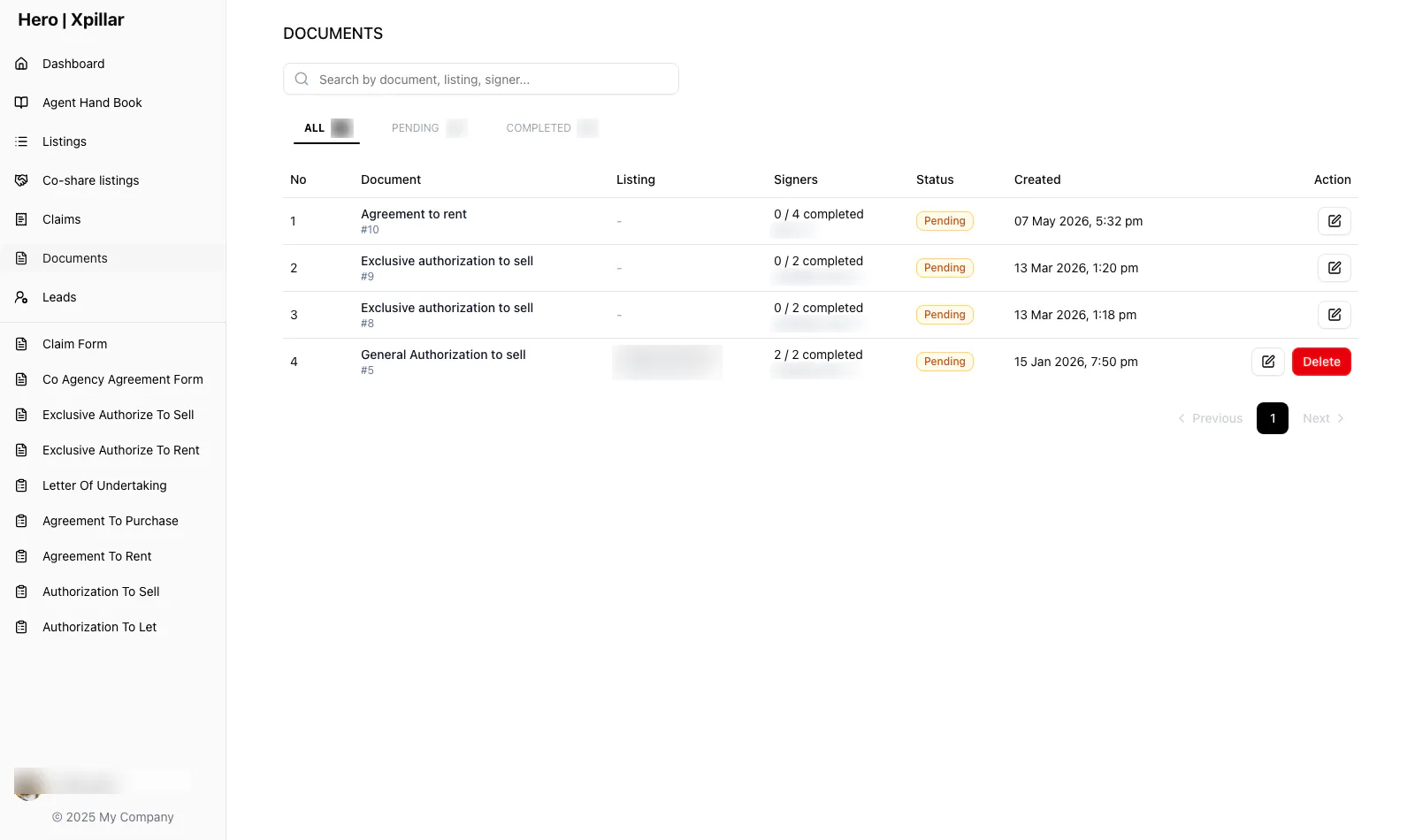
Xpillar Agent Portal — Document register tracking each instrument and its signers. Client work.
Read the case studyThe operating problems
What actually slows this work down.
Nobody knows which version is final
Drafts multiply across inboxes. The copy that gets signed is not always the copy that was reviewed — a risk that only surfaces when it matters most.
Signing is a logistics exercise
Printing, couriering, chasing signatures, stamping: days of coordination per document, invisible to everyone waiting on it.
Filed documents are dead data
Once signed, documents disappear into folders. The information inside them — parties, dates, amounts — has to be re-typed into every downstream system.
State lives in people’s heads
“Waiting on the other side to sign” is a status only one person knows. There is no queue, no dashboard, no alert when things stall.
The workflow
How a well-built system runs it.
A document is prepared in the system from structured inputs, with a preview that matches what will be executed.
The e-signing workflow routes it to each signatory in order.
Stamping follows signing where the document requires it.
The executed document lands in a signed-document register with its full state history.
Where volume justifies it, OCR and extraction turn incoming documents into structured records with human review on exceptions.
Who the system serves
The roles involved.
- Document preparers
- Templates and an editor that produce consistent documents with previews at every step.
- Signatories
- A guided e-signing flow that shows exactly what they are executing.
- Reviewers / operations
- Document state at a glance — draft, signing, signed, stamped — and queues for what needs action.
- Administrators
- Signed-document registers, access control, and audit history.
Suggested modules
The building blocks.
- Document editor and templates
- Preview and state tracking
- E-signing integration (DocuSign shipped in production)
- Stamping workflow
- Signed-document register
- OCR and data extraction
- Human-review queues for exceptions
- Access control and audit history
Integrations that matter
What it connects to.
- E-signature providers (DocuSign integration shipped)
- OCR / document-AI services for extraction
- Existing operational systems that consume the extracted data
Permissions and security
Designed in, not bolted on.
Who can see and change what
- Documents scoped to their transaction’s participants.
- Register and audit access limited to operational roles.
- Review queues route exceptions to accountable humans — automation never gets irreversible authority.
Security considerations
- Preview-equals-executed integrity through the signing flow.
- Full state history per document — who did what, when.
- Extraction runs with confidence thresholds; low-confidence results go to human review, not straight into records.
A realistic scenario
Agreements that take two weeks to execute
Illustrative — not a client account
- A firm prepares agreements in Word, emails PDFs for review, prints for signing, couriers for stamping, and files scans in a shared drive. Each agreement takes days of coordination, and the data inside is re-typed into two other systems.
- Document preparation with previews and templates
- Integrated e-signing and stamping workflow
- Signed-document register with state tracking
- Extraction of key fields into structured records
- Review queue for exceptions
- Execution becomes a tracked workflow rather than a logistics exercise, and completed documents produce structured data instead of filing work. (Illustrative scenario — the signing and stamping workflow mirrors the Xpillar agent portal below.)
The evidence
Shipped systems behind this page.
Related services
How we’d deliver it.
- Applied AI SystemsAI automation, document/data extraction, and intelligent workflows wired into your operations.
- Custom Software DevelopmentInternal platforms, portals, dashboards, and management systems built around your real workflows.
- Agentic SystemsEnd-to-end agentic platforms that automate multi-step business processes.
Frequently asked
Straight answers.
Do you replace our e-signature provider or integrate with it?
Integrate. We have shipped DocuSign-integrated signing flows where the platform prepares the document, hands off for signature, and takes back the executed result with state tracked throughout.
When is OCR worth adding?
When the same document types arrive repeatedly in volume — invoices, forms, IDs, agreements — and people re-type their contents. Below that volume, a well-structured manual workflow with previews and state tracking usually delivers more value per ringgit.
What happens when extraction gets something wrong?
Low-confidence extractions route to a human-review queue instead of entering records directly. We design the review state as part of the workflow, not as an afterthought — accuracy failures should cost a review, never a bad record.
Choose how to get started
Build with us
A system engineered around how you work.
Scoped in a proposal, designed as a prototype, delivered in milestones you can review.
Start a projectSee the work
Systems already running in production.
Marketplaces, operations portals and mobile apps, with the case studies behind them.
View our work