Xpillarwith
Xpillar Agent Portal
Hero, the agent side of the Xpillar ecosystem: listings and the co-share pool that powers true-listing co-broking, custom property proposals, a full legal document suite with clause-level editing, DocuSign e-signing and company-stamp execution, claims with multi-level commission splits across the agent hierarchy, leads, and a staged agent onboarding handbook.
- Xpillar
- Property ecosystem — agent portal
- 2025
Context
Where the project started.
If the client site’s promise is one property, one listing, the agent portal is where that promise is made workable for agents. Hero (hero.xpillar.com) is where listings are submitted, shared, transacted, and claimed — so no agent ever needs to re-advertise a property to participate in it.
It is also Xpillar’s operating system for the agency itself: a handbook that walks new agents through a staged onboarding program, a lead market with claim-and-follow-up rules, training, an agent hierarchy tree, and the document templates a property transaction actually runs on.
Architecturally, Hero is one of the ecosystem’s paired surfaces: a dedicated React application (xpillar-hero) backed by its own Node API service (xpillar-hero-api), deployed independently with its own CI/CD pipeline and scheduled jobs (lead follow-up reminders fire from a daily cron), while reading and writing the same platform data as the admin portal, client site, and app.
Challenge
What shaped the build.
- Legal documents demanded exact state tracking — draft, signing, signed, stamped — with the register as the single source of a deal’s paperwork.
- Co-share access rules are per-listing, not per-user: an agent sees the pool, but works a listing only after a granted request.
- The portal had to serve brand-new agents and veterans alike — hence the staged handbook next to the working tools.
Who uses it
The people the system serves.
- Agents
- Manage listings through their lifecycle, browse and request co-share listings, prepare and e-sign documents, file claims, and work leads.
- Co-broking agents
- Find another agent’s canonical listing in the co-share pool and request to co-broke it — instead of duplicating it.
- New agents
- Onboard through the Agent Hand Book’s staged program (17 checkpoints from “Welcome & Agency Direction” onward), announcements, and training.
Solution
What we designed and built.
What we designed
- A portal organised around how an agent’s week actually runs: listings, co-sharing, documents, claims, leads — one sidebar, no hunting.
- A clause-level document editor that keeps legal instruments consistent: sections can be edited and reordered, but every document starts from the agency’s standard template.
- An onboarding handbook that turns “new agent” into a staged, measurable program rather than a folder of PDFs.
What we built
- The agent portal web application (xpillar-hero) and its dedicated API service (xpillar-hero-api): listings lifecycle management, the co-share pool with preview and request flows, proposals, claims, documents, and leads.
- The document suite: nine template types, clause-level editing, PDF generation, a signer-tracking register, integrated DocuSign e-signing, and the in-portal execution step capturing each signer’s signature, NRIC, position, and the company stamp.
- The claims engine: commission percentages split across the agent’s upline tree, level by level, feeding the admin portal’s review queues.
- The Agent Hand Book: staged onboarding with progress tracking, announcements, the lead market with claim expiry rules, training, cron-driven follow-up reminders (in-app + web push), and manuals.
Key modules
- Listings with lifecycle states
- Co-share pool with preview + co-broke requests
- Custom property proposals — templated, configured per consumer
- Clause-level document editor + PDF generation
- Nine legal document templates
- Document register with signer tracking
- DocuSign e-signing + company-stamp execution
- Claims with multi-level upline commission splits
- Agent hierarchy tree (upline / downline)
- Leads and lead market — 24h claim rule, follow-up reminders
- Agent Hand Book — staged onboarding, training, announcements
- Payment history and subscription
The workflow
- An agent signs in and lands on a dashboard of active and pending listings.
- Listings move through explicit lifecycle states — active, draft, pending, closed, co-share, co-agency, deactivated.
- To work another agent’s property, the agent opens the co-share pool, previews the listing, and sends a co-broke request.
- For interested buyers, the agent generates a custom property proposal from the listing — a configurable, templated document prepared per consumer, which the consumer then views and downloads from their own account on the client site.
- Documents are prepared from the built-in template suite — claim forms, co-agency agreements, exclusive authorisations to sell/rent, letters of undertaking, agreements to purchase/rent — in a clause-level editor, then generated to PDF.
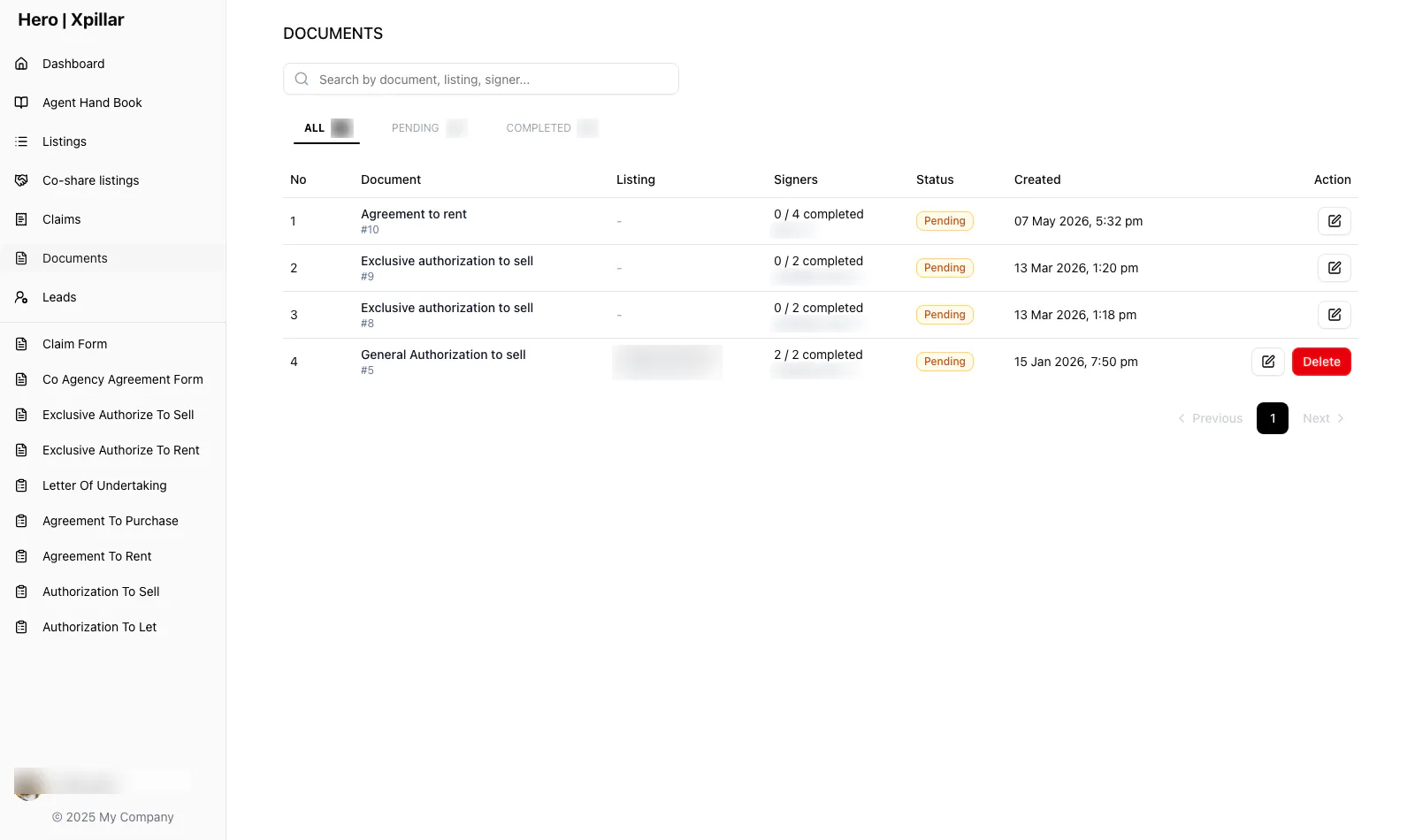
- The document register tracks every instrument and its signers to completion. Execution is electronic end to end: the integrated DocuSign flow for e-signing, plus the portal’s own signing step where each signer’s signature, NRIC, and position are captured and the company stamp is placed on the agreement.
- Claims are filed against completed transactions with the commission split computed across the agent’s upline tree — each level’s percentage recorded per agent — then picked up by the admin portal’s review queues.
Screens
Screens from the shipped build.
Shown in the order a user actually moves through the system; select a screen to enlarge it. Published with the client’s agreement — client data comes first, and only approved screens appear here. Read more about how we protect data in our privacy policy.
Agent portal sign-in screen (credentials censored) Agent dashboard with active and pending listing counts Agent Hand Book — staged onboarding with progress, announcements, lead market, training, and manuals Co-share pool — shared listings with preview and co-broke request actions Clause-level co-agency agreement editor with PDF generation Document register tracking each instrument and its signers Listing application form DocuSign e-signing workflow step
Engineering deep dive
Co-broking without duplicates — the machinery behind true listings
The usual reason a property appears five times on a portal is simple: co-broking by copy-paste. An agent who wants to sell another agent’s property re-advertises it, because that is the only way to attach themselves to the deal. Any platform that wants one listing per property has to replace that incentive with something better.
Hero’s answer is the co-share pool. The mandated agent flags a listing as co-share; other agents browse the pool, preview the canonical listing, and send a request. Acceptance is recorded, and the fee split is formalised through the co-agency agreement template — complete with the professional-fee and 50:50 sharing clauses — generated and e-signed inside the portal. The public listing never moves; the collaboration happens entirely in the machinery underneath it.
That is also why the document suite lives in the same portal as the listings. The moment a co-broke, sale, or tenancy progresses, the paperwork it needs — authorisations, undertakings, agreements — is one click away, pre-templated, tracked signer by signer in the register, and executed through DocuSign. The deal and its documents share one system, so “where is this transaction?” always has an answer.
Outcomes
What the system does today.
We report what the system does in operation — not metrics we can’t verify.
- Agents run listing-to-claim transactions inside one portal instead of coordinating documents over email and print.
- Co-broking happens through the co-share pool and co-agency agreements — cooperation without duplicate public listings.
- New agents onboard through a staged, tracked program, and every document a deal needs is generated, signed, and registered in the same system.
Client statement
In the client’s words.
“The team at Noctverse is positive, easy to work with, and always willing to help despite our budget constraints. They didn't just build our system — they also helped us rethink our business processes and suggested practical workflows that will support our growth in the long run.”

Norman Soo
Director, XPillar