Xpillarwith
Xpillar Admin Portal
The operator’s control room of the Xpillar ecosystem: traffic and listing analytics, lifecycle-tabbed listing management, verified agent and consumer registers, a per-module permission matrix across three admin roles, and a full audit trail.
- Xpillar
- Property ecosystem — admin portal
- 2025
Context
Where the project started.
A true-listing marketplace is a governance problem as much as a product: someone has to verify owners, admit agents, police listing states, and answer for every change. AdminCore (admin.xpillar.com) is where Xpillar’s team does that.
It is the only surface that sees everything — companies, developers, projects, properties, listings, consumers, agents, staff users, news, documents, certificates, pricing plans — and every action it takes is attributable in the audit log.
Like the agent portal, AdminCore is a paired surface: a dedicated React application (xpillar-admin) backed by its own Node API service (xpillar-admin-api), deployed independently while governing the same platform data every other surface reads.
Challenge
What shaped the build.
- Consumer and agent registers hold real personal data — role-scoped access and full attribution were non-negotiable.
- The permission model had to be explicit enough to delegate operations without handing every admin every switch.
- Governance had to keep pace with the true-listing model: lifecycle states, verified admissions, and auditability are what keep the marketplace clean.
Who uses it
The people the system serves.
- Directors
- Full visibility and control across every module, scoped by the permission matrix.
- Master admins / super admins
- Operate the marketplace day to day with capabilities granted per module — create, read, update, delete are separate switches.
- Account department
- Signs in with its own identity; its actions land in the audit trail like everyone else’s.
Solution
What we designed and built.
What we designed
- A control-room dashboard that answers “how is the marketplace doing?” at a glance — traffic, engagement, and top properties on one screen.
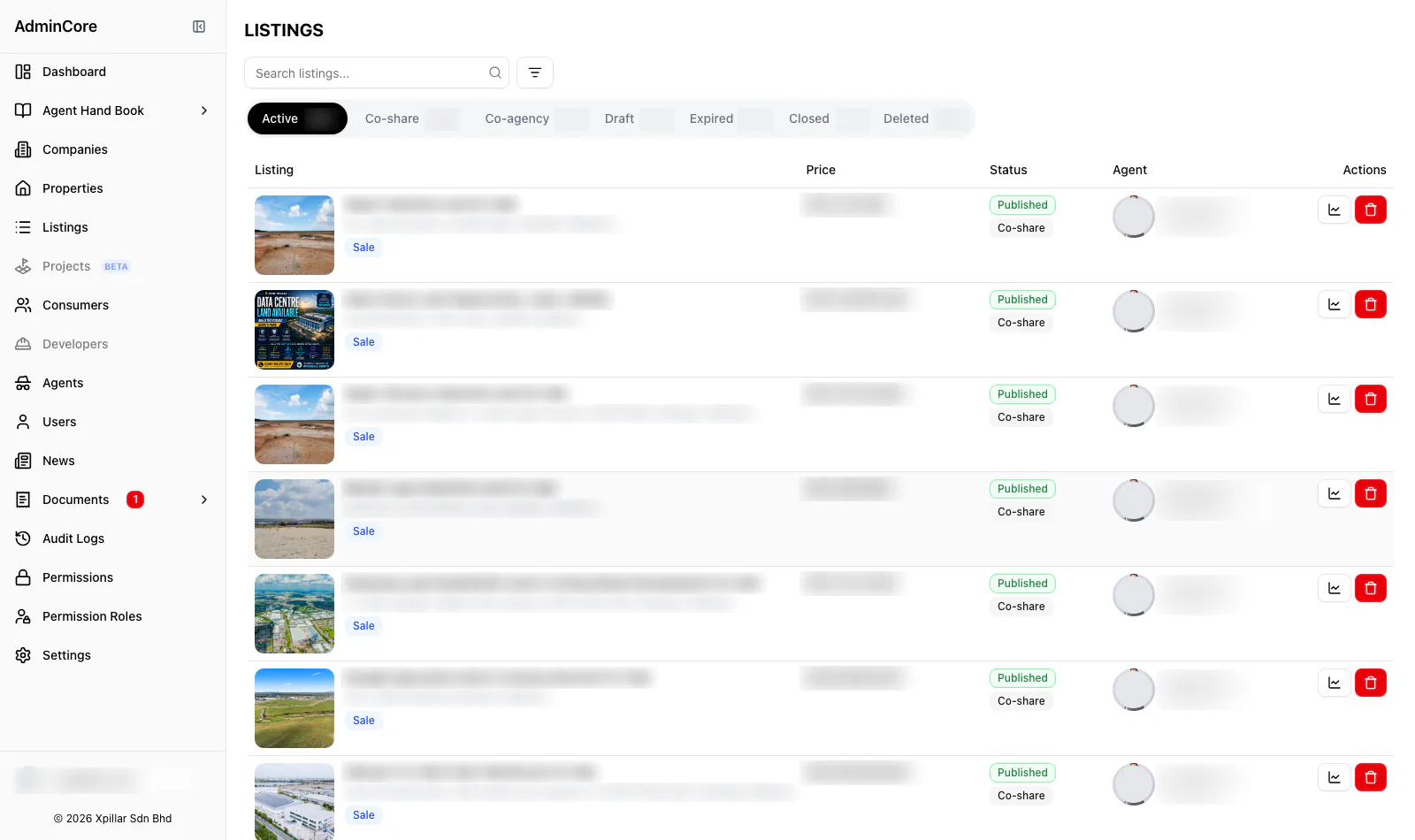
- Listing governance as tabs, not filters: the lifecycle states of the true-listing model are the primary navigation.
- A permission matrix that makes authority legible — a director can read the entire access model off one grid.
What we built
- The admin portal: dashboards with traffic analytics, registers for companies, properties, listings, consumers, agents, users, and news.
- REN-verified agent invitation flows and consumer/owner typing.
- The permission system: role × module × action, enforced at the platform layer and edited in the matrix UI.
- The audit log capturing sign-ins, page visits, and data changes across 167+ pages of history at capture.
Key modules
- Analytics dashboard — traffic, visitors, top properties
- Listings with lifecycle tabs (active / co-share / co-agency / …)
- Companies, developers, and projects registers
- Properties register
- Consumers and owners register
- Agent register with REN-verified invitations
- Agent claims review queues
- Staff users
- News publishing
- Certificates and pricing plans
- Trainings and Agent Hand Book management
- Permission matrix and permission roles
- Audit logs
- Documents oversight
The workflow
- The dashboard opens on the numbers that matter: users, consumers, listings, and a traffic overview — daily views, new vs returning visitors, and the most-viewed properties.
- Listings are governed through lifecycle tabs — active, co-share, co-agency, draft, expired, closed, deleted — so one property’s canonical listing moves through states instead of multiplying.
- Agents are admitted by invitation against their REN/PEA registration; consumers and owners are registered and typed.
- Staff capabilities are configured in the permission matrix: per module, per action, per role — visible on one screen.
- Every sign-in, visit, and change is written to the audit log with actor and timestamp.
Screens
Screens from the shipped build.
Shown in the order a user actually moves through the system; select a screen to enlarge it. Published with the client’s agreement — client data comes first, and only approved screens appear here. Read more about how we protect data in our privacy policy.
Admin dashboard — users, consumers, listings, and a 7-day traffic overview with top properties Listing management with lifecycle tabs: active, co-share, co-agency, draft, expired, closed, deleted Permission matrix — create/read/update/delete per module for Director, Master Admin, and Super Admin Audit log attributing sign-ins, visits, and changes to named users Consumer and owner register (personal data censored) Agent register with REN numbers and invitation tracking (personal data censored) Staff user register (personal data censored) Agent claims review screen
Outcomes
What the system does today.
We report what the system does in operation — not metrics we can’t verify.
- The operator runs the whole marketplace — listings, people, permissions, content — from one permissioned portal.
- Marketplace health is visible daily: traffic, new versus returning visitors, and which properties are drawing attention.
- Every administrative action is attributable, and staff capability is defined per module and per action rather than all-or-nothing.
Client statement
In the client’s words.
“The team at Noctverse is positive, easy to work with, and always willing to help despite our budget constraints. They didn't just build our system — they also helped us rethink our business processes and suggested practical workflows that will support our growth in the long run.”

Norman Soo
Director, XPillar